CodeCraft icon: angle brackets with a slash on a dark tile

CodeCraft

A self-hosted coding agent for your browser and terminal: any model, your tools, your rules.
Run Claude, Gemini, OpenRouter, opencode or your own models as coding agents with files, shell, MCP and subagents,
approve what they do from any device, automate recurring work, and see exactly what every request costs.

Version 0.1.0 License: MIT Rust backend React PWA Docker: amd64 and arm64

Install · How it works · Modes · Models · Terminal client · Automations · Integrations · Users · Statistics · Configuration · Themes · Development
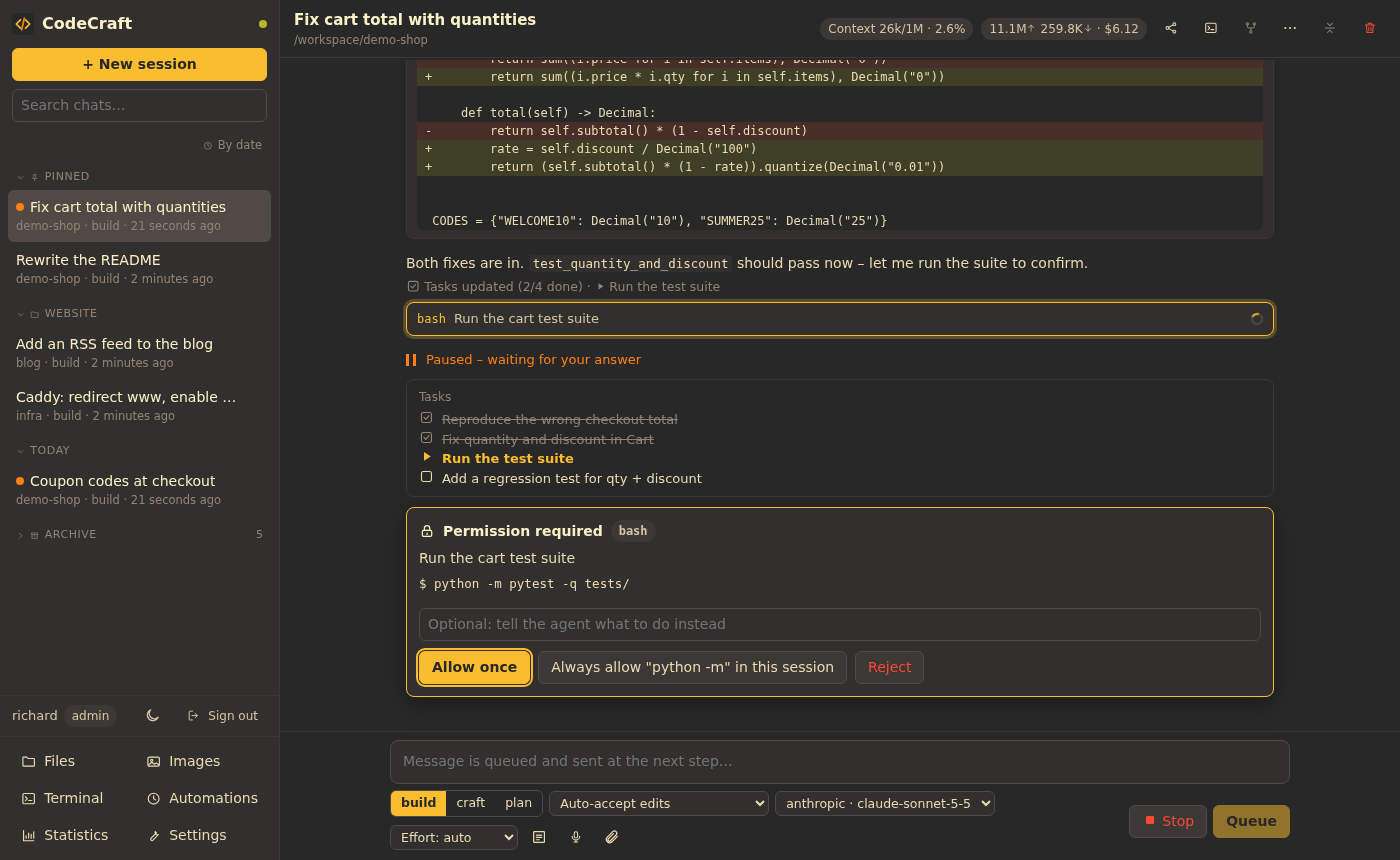

A CodeCraft session in the Gruvbox dark theme: a diff of the fix, the task list, and a permission card asking before the test suite runs; the sidebar shows pinned chats, a folder and the archive
A session: the agent works through its task list, shows diffs, and asks before anything outside the rules.

Any model

Anthropic natively, plus everything that speaks the OpenAI API: Gemini, OpenRouter, opencode, fal.ai, Ollama, vLLM, llama.cpp. Mix them in one chat, with automatic fallback.

Real tools

Files, shell, web, an interactive browser, LSP diagnostics, task lists, subagents, skills – and every tool of your MCP servers.

You decide

Permission cards with diffs, questions from agents and MCP servers, per-tool rules. On your phone, with push notifications.

Every token counted

Tokens, cache hits, prefill and output speed, and cost per request – per chat, per day and per model.

## Install You need Docker with Compose. The image is published for **amd64 and arm64**. ```sh mkdir codecraft && cd codecraft curl -fsSLO https://git.familie-zink.org/zink/codecraft/raw/branch/main/docker-compose.release.yml curl -fsSL --create-dirs -o docker/seccomp-sandbox.json \ https://git.familie-zink.org/zink/codecraft/raw/branch/main/docker/seccomp-sandbox.json curl -fsSL -o .env https://git.familie-zink.org/zink/codecraft/raw/branch/main/.env.example $EDITOR .env # workspace path, provider keys, time zone docker compose -f docker-compose.release.yml up -d docker compose -f docker-compose.release.yml logs codecraft # one-time setup code for the first admin ``` Open `http://localhost:8787`, enter the setup code and create the admin account. Then add a provider under *Settings → Providers & models* – or put the keys into `.env` and reference them in the config as `${NAME}`. **Update:** `docker compose -f docker-compose.release.yml pull && docker compose -f docker-compose.release.yml up -d`. Pin a version with `CODECRAFT_VERSION=0.1.0` in `.env`. Admins see a notice when a new release is out. **From source:** `git clone https://git.familie-zink.org/zink/codecraft.git && cd codecraft`, `cp .env.example .env`, then `docker compose up -d --build`. All state – configuration, database, backups, the agent's home directory – lives in the Docker volume `codecraft-data`; recreating the container keeps it. Your projects are mounted from `WORKSPACE`. The port is bound to `127.0.0.1`: put a TLS reverse proxy in front of it (with WebSocket support) and set `auth.public_url` – installing the app and push notifications require HTTPS. ## How it works CodeCraft runs on your server, next to your projects. You talk to it from a browser, the installed app or the terminal client; the agent keeps working when you close the tab. 1. **Pick a folder and a task.** The start screen asks what you want to do – build, plan, craft something, model a part for 3D printing – and where: a new folder, an existing one or a git repository. 2. **Say what you want.** The agent plans with a task list, reads the code and makes changes. 3. **Approve or answer.** Anything outside your rules shows up as a card: allow once, allow for the session, or reject with feedback. Questions from agents and MCP servers too. 4. **Delegate.** The agent hands work to subagents – in parallel or in the background, on other models and hosts – and continues while they run. Every change can be reviewed hunk by hunk, rewound to a checkpoint, or isolated in a git worktree. Sessions can be pinned, archived and filed into folders; Ctrl+K opens the command palette, and prompt templates with placeholders save typing.
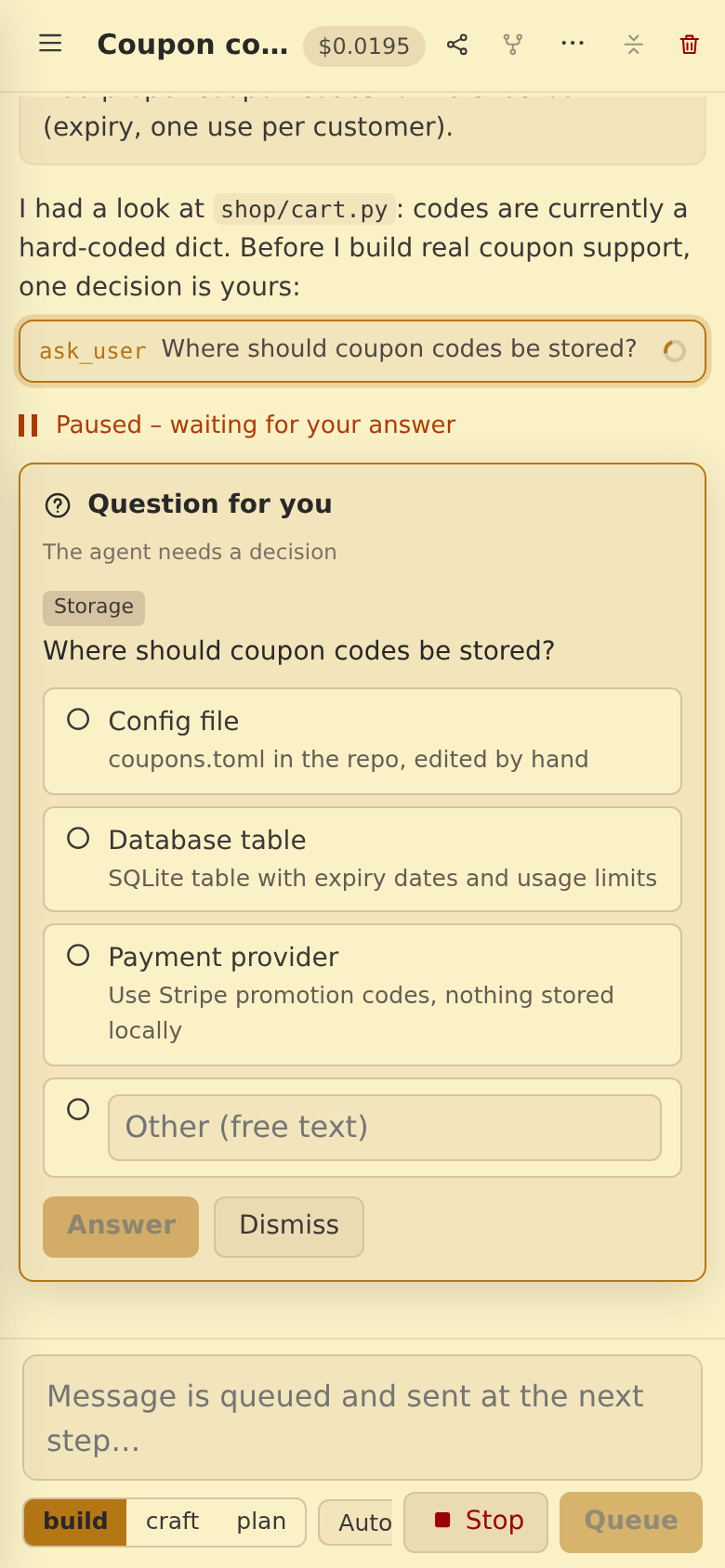
CodeCraft on a phone in a light theme: the agent asks where coupon codes should be stored and offers three options plus free text
Mobile: answer questions and approve changes from your phone. Share links and text from other apps into a chat.
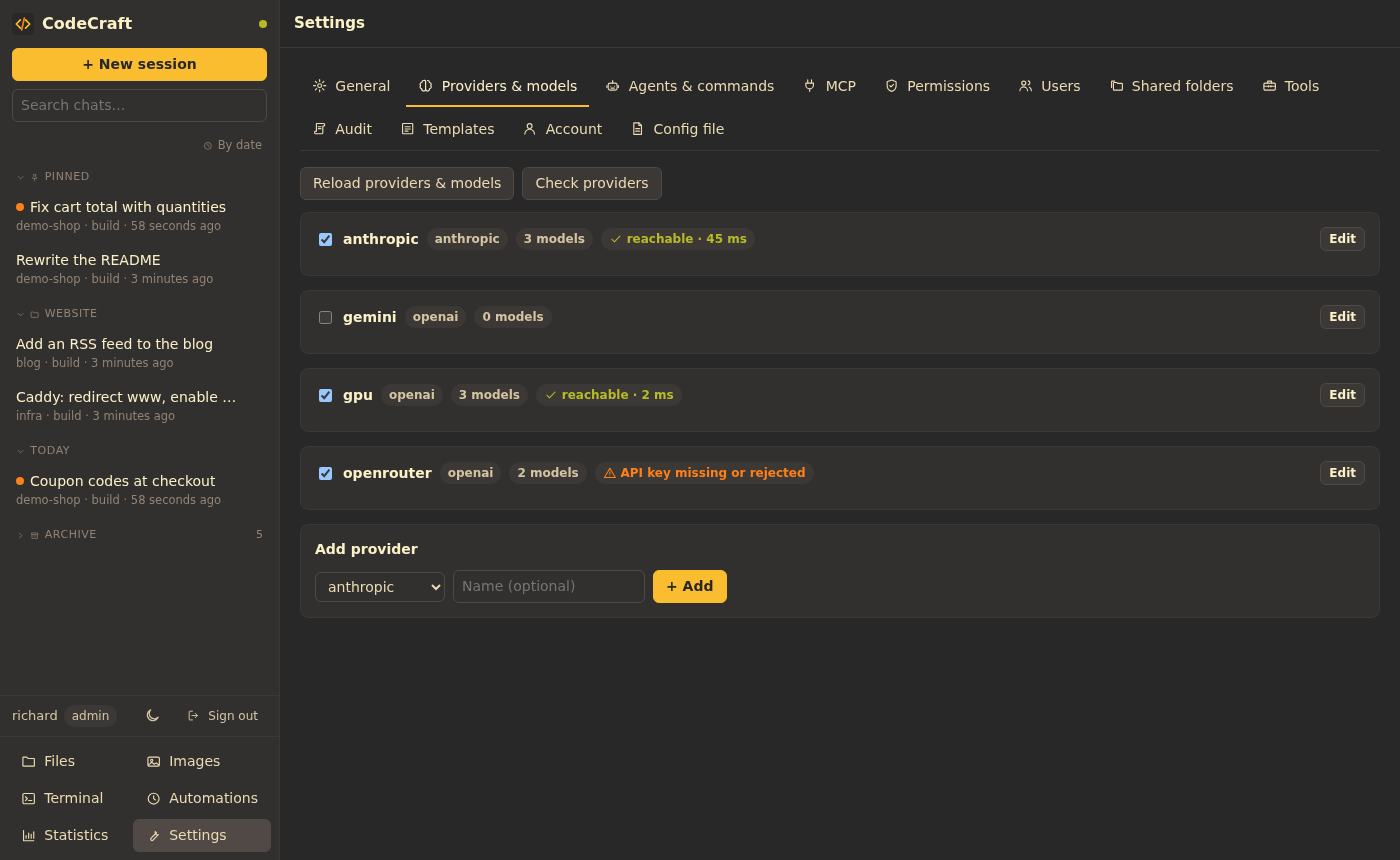
Settings: providers with model counts and their status (reachable with latency, API key missing or rejected)
Settings: providers, models, prices, MCP, permissions, users, templates and backups – all in the UI.
## Modes | Mode | What it does | |---|---| | **build** | Full access: implement, edit, run. | | **plan** | Read-only: investigate, ask, and propose a step-by-step plan. One click switches to build. | | **craft** | Study a target – a website, app, game or old program – and build your own version, check it visually and refine. Websites are captured at several screen widths in a headless browser and compared with the build. *Clean room* uses only what a visitor sees; *deep mode* may read the source. | | *custom* | Your own modes and subagents – in the UI, the config file or as Markdown in `.codecraft/agents` / `.claude/agents`. | Projects keep working the way they do in Claude Code and opencode: `AGENTS.md`, `CLAUDE.md`, slash commands in `.claude/commands` and skills in `.claude/skills` are picked up automatically. The agent keeps notes about a project in `.codecraft/memory.md`; your personal memory applies to every project. ## Models Every provider is an endpoint with a list of models. Each model can have a context size, output limit, reasoning effort, extra request options and prices per million tokens. - **Several models per chat:** switch the model at any time, give modes a fixed model, and run subagents on other models – e.g. a coding model on one GPU host and a small model that writes documentation in the background on another. - **Fallback:** if a host is unreachable or its budget is used up, the request goes to the model's fallback. - **Concurrency limits:** `max_concurrency` per host or model queues requests for servers that process one at a time; waiting time is shown and never counted as model latency. - **Status:** every five minutes each provider's model list is fetched (no tokens used), so you see at a glance which hosts answer and which keys are rejected. ## Terminal client `codecraft` is a full-screen terminal client in the style of Claude Code and opencode. The agent loop, the tools and the chat history run **on your machine**, in the current folder. Signed in to a CodeCraft server, it uses the server's models, keys, budgets, modes, rules, skills, MCP tools and your theme, and the server counts usage and costs. Without a server, a guided setup connects Anthropic, OpenAI, Gemini, OpenRouter, opencode or a local model server (Ollama, LM Studio, llama.cpp, vLLM – detected automatically); both can be mixed. ```sh cargo install --locked --git https://git.familie-zink.org/zink/codecraft codecraft-cli codecraft login # server URL, user name, password → creates an API token codecraft # start in the current folder; /help lists the commands ``` There are no prebuilt binaries yet, so the client is installed from source (needs a Rust toolchain). A server that has binaries in `CODECRAFT_CLI_DIR` (`codecraft-linux-x86_64`, `codecraft-linux-aarch64`) also offers `curl -fsSL https:///cli/install.sh | sh` and `codecraft update`. ## Automations

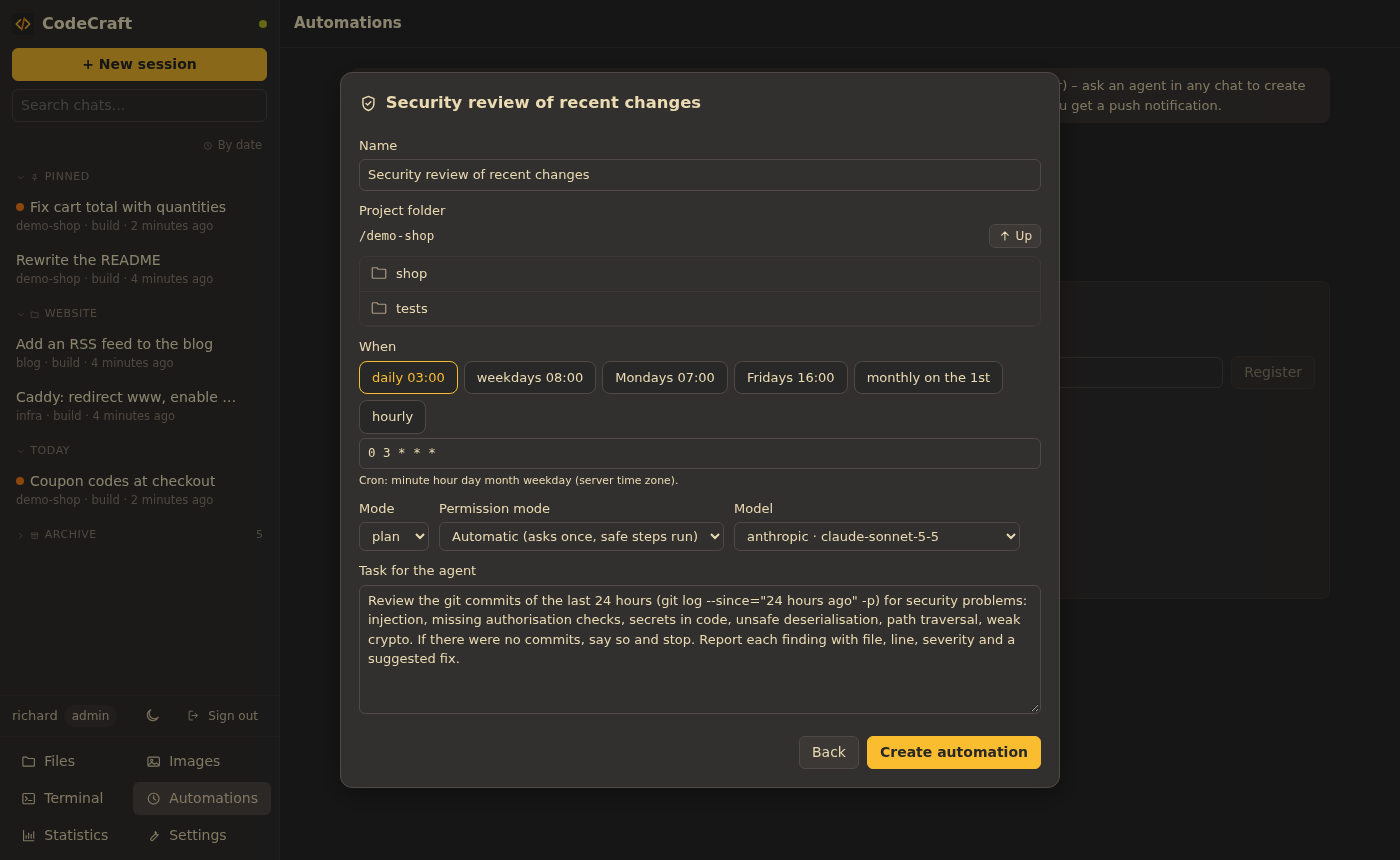
Creating an automation from a template: schedule chips, cron expression, mode, permission mode, model and the task for the agent

An automation is a Markdown file with a cron schedule in its front matter (`.codecraft/jobs/.md`). Each run is a normal chat session, so you can read and continue it; if it needs a permission, you get a push notification. Ask an agent in any chat to set one up, start from a template (dependency check, security review of recent commits, test suite health, daily summary, TODO report, documentation freshness) or write the file yourself. **Webhooks** start an automation from outside, e.g. on every push: the request is checked with a shared secret or a Gitea/GitHub HMAC signature, and its JSON payload is handed to the agent. ## Integrations - **API tokens** (*Settings → Account*) with full or read-only scope for scripts and the terminal client. - **Prometheus:** set `server.metrics_token` and scrape `GET /metrics` with `Authorization: Bearer ` – requests, errors, tokens, cost and time per model, provider status, sessions, pending permissions. - **JSON logs:** `CODECRAFT_LOG_FORMAT=json` writes one JSON object per line. - **Backups:** daily at 03:00 into `/data/backups` (the last 30 are kept), optionally copied to any S3-compatible bucket (AWS, MinIO, Garage, Backblaze B2, Hetzner). *Settings → Audit* shows them, creates one on demand and downloads them. - **Health:** `GET /api/health` for monitoring, with version and commit. ## Users and security - Local accounts (Argon2 passwords) and single sign-on via OpenID Connect (Authentik, Authelia, Keycloak, …) with optional admin and access groups. - **Admins** manage providers, MCP, permissions, users and shared folders and see all statistics. **Users** see their own sessions and statistics. - Every user works in `/`; admins can share additional folders. Sessions are private and can be shared read-only. An audit log records sign-ins, permissions and configuration changes. - Shell commands of non-admin users run in a **bubblewrap sandbox**: read-only system, only their folders writable, own home and processes, no server environment. It needs the security options in the compose file; without them non-admins cannot run shell commands. - The browser tool reaches the internet and `localhost`, never addresses in private networks. ## Statistics

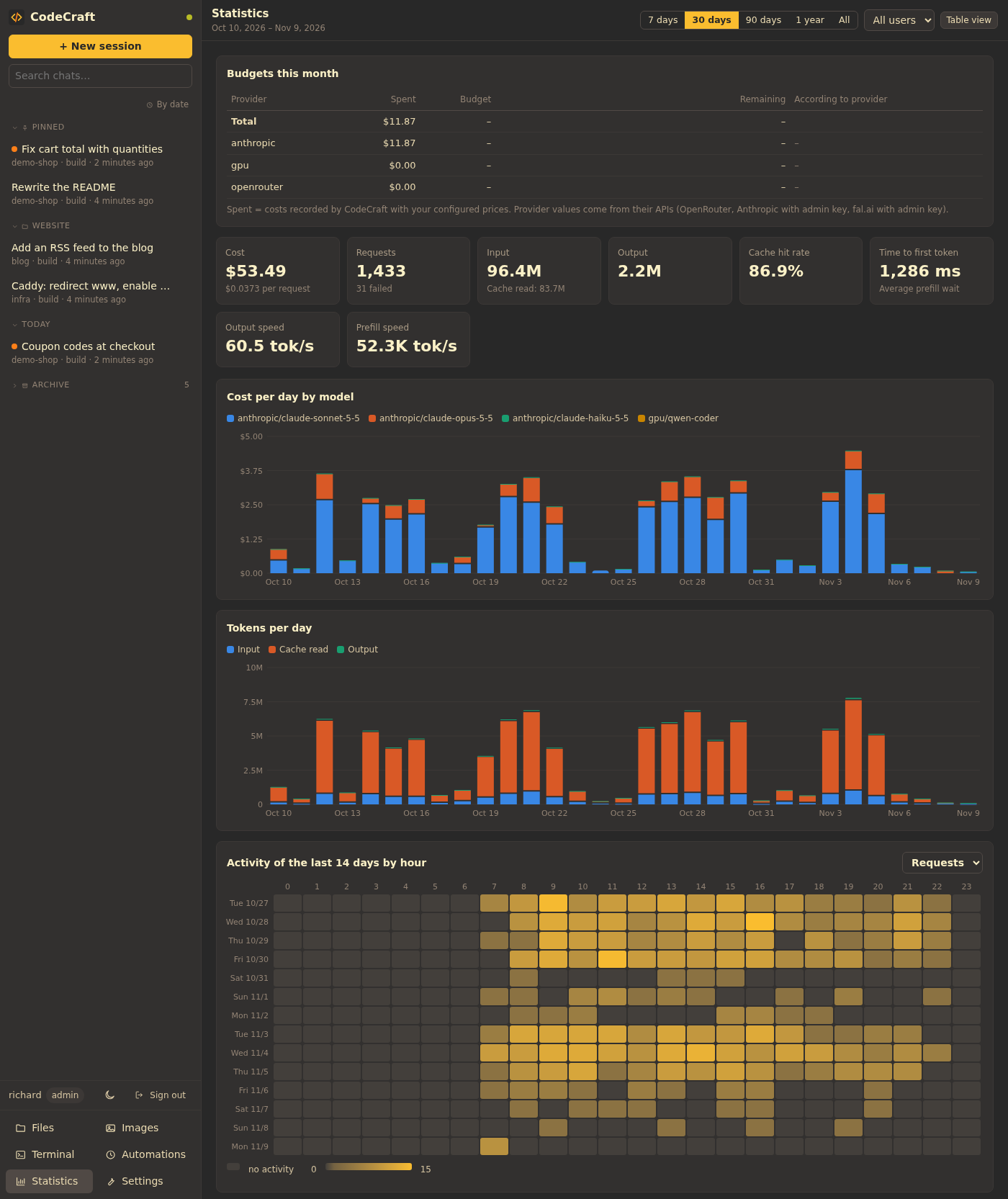
The statistics dashboard: monthly budgets, cost and token tiles, cost per day stacked by model, tokens per day, and an activity heatmap of the last 14 days in the theme accent color

Every model request is stored with input, output and cache tokens, time to first token, prefill and output speed, and its cost at the price configured at that moment. The dashboard shows totals, cost per day by model, tokens per day, an activity heatmap of the last 14 days, and tables per model, provider, mode, user and session – each chart also as a table. Turn on the daily cost summary to get a push notification every evening. ## Configuration One commented TOML file, `/data/config.toml` in the volume, created from [`config.example.toml`](config.example.toml) on first start. The settings pages edit it in place and keep your comments. Secrets belong in the environment and are referenced as `${NAME}`. | Section | Purpose | |---|---| | `[server]` | workspace, default and small model, currency, auto-compaction, subagent limit, `metrics_token` | | `[providers.]` | `kind = "anthropic" \| "openai"`, `base_url`, `api_key`, `max_concurrency`, `models` (with prices and `fallback`) | | `[mcp.]` | `type = "stdio"` (command, args, env) or `"http"` (url, headers) | | `[permissions]` | `allow` / `ask` / `deny` per tool (globs like `mcp__*`); `bash_rules` for commands | | `[agents.]` | modes and subagents: model, tools, `max_parallel`, prompt | | `[auth]`, `[auth.oidc]` | sign-in, public URL, single sign-on | | `[sandbox]` | shell sandbox for non-admins (`auto`, `always`, `off`) | | `[backup]`, `[backup.s3]` | daily backups, retention, S3 target | | `[craft]` | headless browser, screen widths, clean room | Compound shell commands (`&&`, `;`, `|`) are only auto-allowed when every part is allowed. ## Themes Pick a **base theme** in *Settings → General* and switch **light / dark / auto** there or with the theme button in the sidebar (auto follows the system preference). Every base theme has a dark and a light variant. The palettes come from [zink/trilium-themes](https://git.familie-zink.org/zink/trilium-themes) (MIT, see [`web/src/themes/LICENSE-trilium-themes`](web/src/themes/LICENSE-trilium-themes)), which in turn are based on: | Theme | Variants | Palette source | License | |---|---|---|---| | Gruvbox | Dark, Light | [morhetz/gruvbox](https://github.com/morhetz/gruvbox) | MIT | | Ash | Dark, Light | original, Gruvbox-derived ([zink/trilium-themes](https://git.familie-zink.org/zink/trilium-themes)) | MIT | | Harbor | Dark, Light | [HANCORE-linux/omarchy-harbordark-theme](https://github.com/HANCORE-linux/omarchy-harbordark-theme) | MIT | | Coffee | Dark, Latte | [megabyte0x/omarchy-coffee-theme](https://github.com/megabyte0x/omarchy-coffee-theme) | MIT | | Solarized | Dark, Light | [Solarized by Ethan Schoonover](https://ethanschoonover.com/solarized/) | MIT | | Tokyo Night | Night, Day | [folke/tokyonight.nvim](https://github.com/folke/tokyonight.nvim) | Apache-2.0 | Further standard themes (palettes re-created from the published colour specifications): | Theme | Variants | Palette source | License | |---|---|---|---| | Nord | Dark, Light (Snow Storm background) | [nordtheme/nord](https://github.com/nordtheme/nord) | MIT | | VS Code | Dark Modern, Light Modern | [microsoft/vscode](https://github.com/microsoft/vscode) | MIT | | GitHub | Dark, Light | [primer/github-vscode-theme](https://github.com/primer/github-vscode-theme) | MIT | | Catppuccin | Mocha, Latte | [catppuccin/catppuccin](https://github.com/catppuccin/catppuccin) | MIT | | One | One Dark, One Light | [atom/atom](https://github.com/atom/atom) | MIT | | Dracula | Dracula, Alucard | [dracula/dracula-theme](https://github.com/dracula/dracula-theme) | MIT | | Rosé Pine | Main, Dawn | [rose-pine/rose-pine-theme](https://github.com/rose-pine/rose-pine-theme) | MIT | | Everforest | Dark, Light | [sainnhe/everforest](https://github.com/sainnhe/everforest) | MIT | | Kanagawa | Wave, Lotus | [rebelot/kanagawa.nvim](https://github.com/rebelot/kanagawa.nvim) | MIT | Colours, syntax highlighting and chart palettes come from CSS variables, one file per variant in [`web/src/themes`](web/src/themes). To add a base theme ``: 1. Copy `gruvbox-dark.css` / `gruvbox-light.css` to `-dark.css` / `-light.css` and change the values on `:root[data-theme="-dark"]` / `"-light"`; note source and license in the header. 2. Import both in `themes/index.ts` and add the base theme to `THEMES` in `web/src/theme.ts`. The variables cover surfaces (`--bg0`–`--bg3`), text (`--fg0`–`--fg3`, `--muted`), accents, diffs, syntax (`--syntax-*`) and the browser bar colour (`--theme-color`). The chart palettes (`--series-1`–`8` categorical, `--seq-1`–`6` sequential) live in `themes/base.css` per light/dark mode and are validated for colour-vision deficiencies. ## Development Requirements: Rust (edition 2024) and Node ≥ 20.19. ```sh # backend – writes ./data/config.toml on first start cd server && CODECRAFT_CONFIG=../data/config.toml cargo run # frontend with hot reload, proxies /api to 127.0.0.1:8787 cd web && npm install && npm run dev # terminal client cargo run -p codecraft-cli ``` Tests: `cargo test --workspace` · type check: `cd web && npx tsc --noEmit`. ``` core/ shared crate: types, config, providers, permissions, prompts server/ Rust (axum, tokio) runner.rs agent loop: streaming, tools, permissions, subagents, compaction tools/ built-in tools (files, shell, web, browser, agent, craft) mcp.rs MCP client (stdio, Streamable HTTP, elicitation) jobs.rs automations and webhooks auth.rs users, sessions, API tokens, OpenID Connect cli/ terminal client (ratatui) web/ React + Vite PWA src/components chat, composer, cards, settings, statistics src/themes CSS themes src/i18n English (reference) and German ``` The Docker build cross-compiles the server with [cargo-zigbuild](https://github.com/rust-cross/cargo-zigbuild), so a multi-arch image builds quickly on either architecture: `docker buildx build --platform linux/amd64,linux/arm64 -t /codecraft: --push .` Translations: copy `web/src/i18n/en.ts`, translate the values and register the language in `web/src/i18n/index.ts` – the type checker reports missing keys. ## Status Early, but in daily use. See the [changelog](CHANGELOG.md). Planned next: - Prebuilt terminal client binaries (Linux, macOS, Windows) - MCP OAuth, resources and prompts - The OpenAI Responses API ## License [MIT](LICENSE) © Richard Zink. The theme palettes keep the licenses listed under [Themes](#themes).