CodeCraft icon: angle brackets with a slash on a dark tile

CodeCraft

A self-hosted coding agent for your browser and terminal: any model, your tools, your rules.
Run Claude, Gemini, OpenRouter, opencode or your own models as coding agents with files, shell, MCP and subagents,
approve what they do from any device, automate recurring work, and see exactly what every request costs.

Version v202611-00058 License: MIT Rust backend React PWA Docker: amd64 and arm64

Install · How it works · Modes · Models · Terminal client · Automations · Code factory · Integrations · Users · Statistics · Configuration · Themes · Development
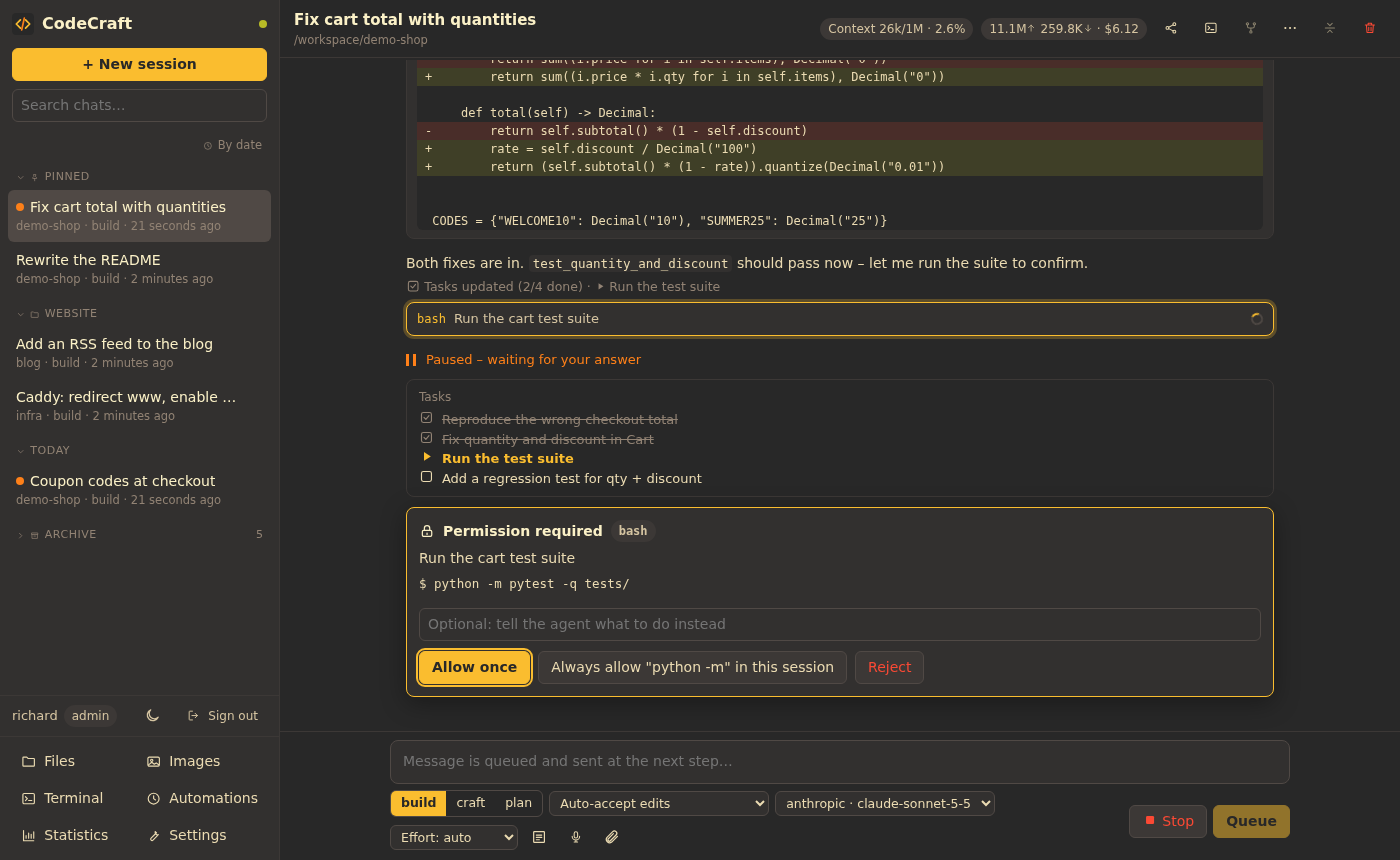

A CodeCraft session in the Gruvbox dark theme: a diff of the fix, the task list, and a permission card asking before the test suite runs; the sidebar shows pinned chats, a folder and the archive
A session: the agent works through its task list, shows diffs, and asks before anything outside the rules.

Any model

Anthropic natively, plus everything that speaks the OpenAI API: Gemini, OpenRouter, opencode, fal.ai, Ollama, vLLM, llama.cpp. Mix them in one chat, with automatic fallback.

Real tools

Files, shell, web, an interactive browser, LSP diagnostics, task lists, subagents, skills – and every tool of your MCP servers.

You decide

Permission cards with diffs, questions from agents and MCP servers, per-tool rules. On your phone, with push notifications.

Every token counted

Tokens, cache hits, prefill and output speed, and cost per request – per chat, per day and per model.

## Install You need Docker with Compose. The image is published for **amd64 and arm64**. ```sh mkdir codecraft && cd codecraft curl -fsSLO https://git.familie-zink.org/zink/codecraft/raw/branch/main/docker-compose.release.yml curl -fsSL --create-dirs -o docker/seccomp-sandbox.json \ https://git.familie-zink.org/zink/codecraft/raw/branch/main/docker/seccomp-sandbox.json curl -fsSL -o .env https://git.familie-zink.org/zink/codecraft/raw/branch/main/.env.example $EDITOR .env # workspace path, port, user id, time zone docker compose -f docker-compose.release.yml up -d docker compose -f docker-compose.release.yml logs codecraft # one-time setup code for the first admin ``` Open `http://localhost:8787`, enter the setup code and create the admin account. Then add a provider under *Settings → Providers & models*. `.env` only holds deployment settings; keys, tokens and everything else are set in the UI and stored in the configuration file (`${NAME}` references to environment variables still work). **Update:** `docker compose -f docker-compose.release.yml pull && docker compose -f docker-compose.release.yml up -d`. Releases are named `vYYYYMM-NNNNN` (a counter per month). Pin one with `CODECRAFT_VERSION=v202611-00001` in `.env`. Admins see a notice when a new release is out. **From source:** `git clone https://git.familie-zink.org/zink/codecraft.git && cd codecraft`, `cp .env.example .env`, then `docker compose up -d --build`. All state – configuration, database, backups, the agent's home directory – lives in the Docker volume `codecraft-data`; recreating the container keeps it. Your projects are mounted from `WORKSPACE`. The port is bound to `127.0.0.1`: put a TLS reverse proxy in front of it (with WebSocket support) and set `auth.public_url` – installing the app and push notifications require HTTPS. **Moving to another host** (for example Unraid with bind mounts instead of the Docker volume): `scripts/move-server.sh root@newhost:/mnt/user/appdata/codecraft --workspace /mnt/user/projects` copies the workspace, stops CodeCraft, streams the data volume to `/data`, writes a `docker-compose.yml` (and a `start.sh` for hosts without Compose) with bind mounts, starts the published image there and runs `scripts/smoke-test.sh`. The old container is only stopped, so you can roll back. `--help` lists the options (owner, port, bind address, dry run). `--tools-dir /mnt/disks/ssd/codecraft` puts everything agents install or download – the agent home (`/data/home`: toolchains, pip/npm/cargo packages, caches), the users' homes and `/tmp` – on a separate disk; the data folder keeps only the database, configuration and backups. Step by step, with rollback and troubleshooting: [docs/MOVING.md](docs/MOVING.md). ## How it works CodeCraft runs on your server, next to your projects. You talk to it from a browser, the installed app or the terminal client; the agent keeps working when you close the tab. 1. **Pick a folder and a task.** The start screen asks what you want to do – build, plan, craft something, model a part for 3D printing – and where: a new folder, an existing one or a git repository. 2. **Say what you want.** The agent plans with a task list, reads the code and makes changes. 3. **Approve or answer.** Anything outside your rules shows up as a card: allow once, allow for the session, or reject with feedback. Questions from agents and MCP servers too. 4. **Delegate.** The agent hands work to subagents – in parallel or in the background, on other models and hosts – and continues while they run. Every change can be reviewed hunk by hunk, rewound to a checkpoint, or isolated in a git worktree. Sessions can be pinned, archived and filed into folders; Ctrl+K opens the command palette, and prompt templates with placeholders save typing.
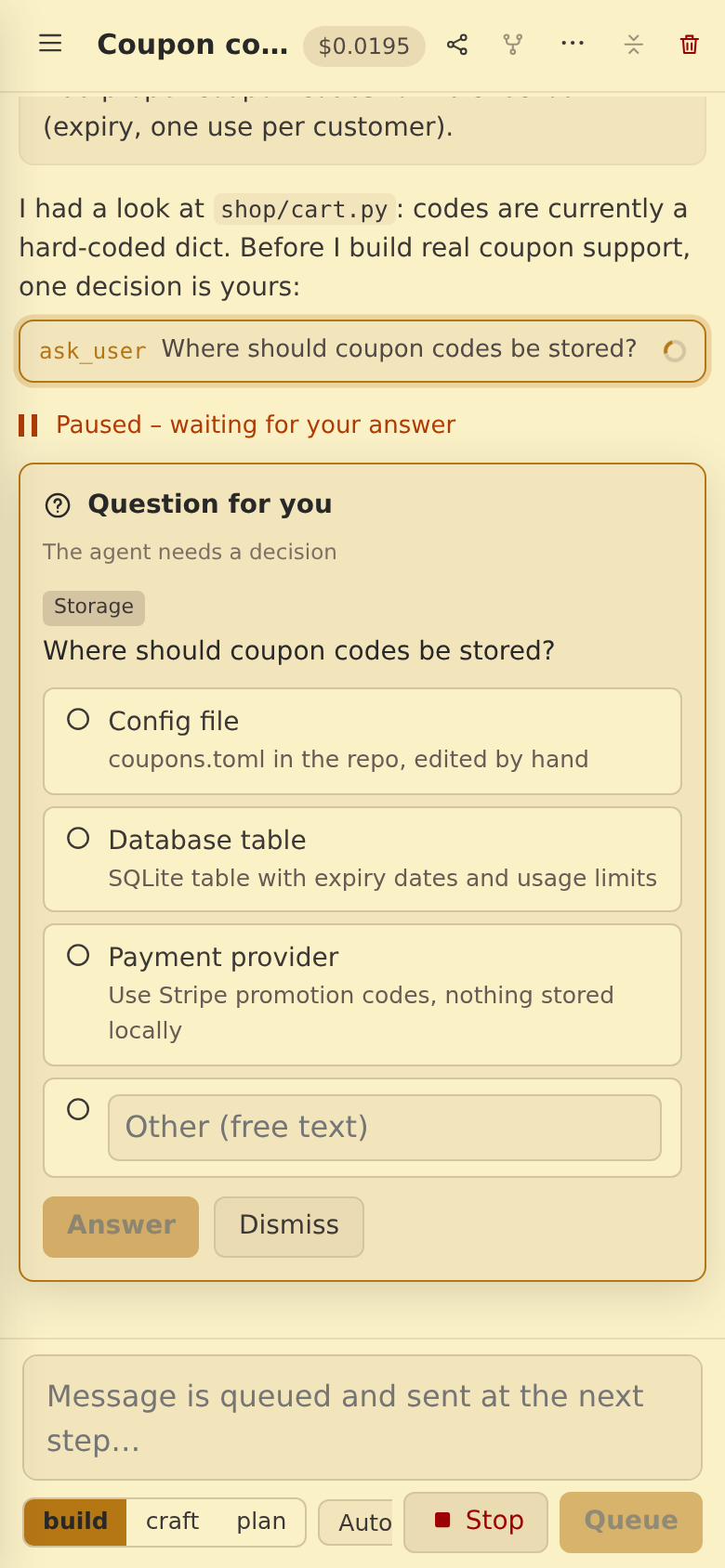
CodeCraft on a phone in a light theme: the agent asks where coupon codes should be stored and offers three options plus free text
Mobile: answer questions and approve changes from your phone. Share links and text from other apps into a chat.
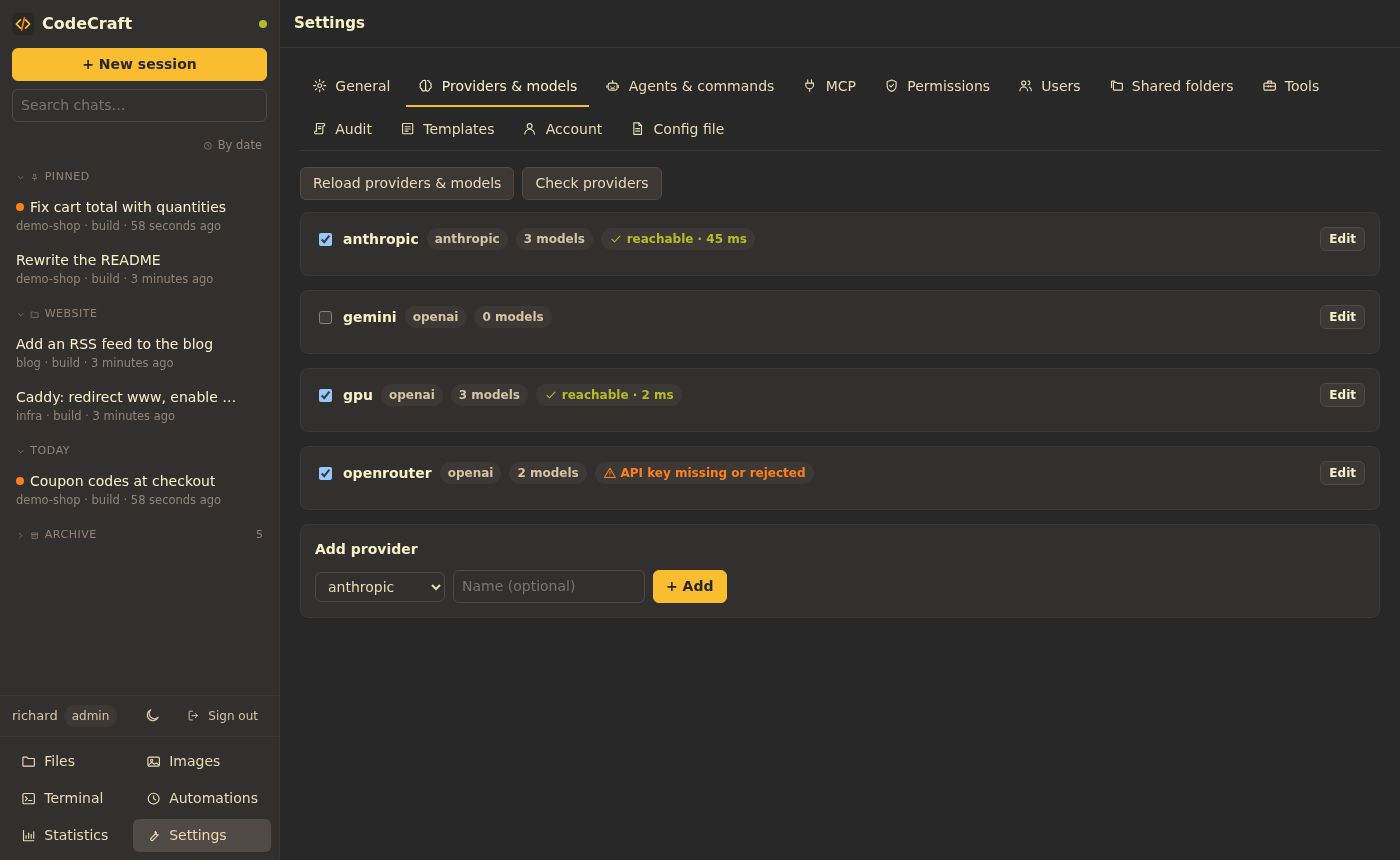
Settings: providers with model counts and their status (reachable with latency, API key missing or rejected)
Settings: providers, models, prices, MCP, permissions, users, templates and backups – all in the UI.
## Modes | Mode | What it does | |---|---| | **build** | Full access: implement, edit, run. | | **plan** | Read-only: investigate, ask, and propose a step-by-step plan. One click switches to build. | | **craft** | Study a target – a website, app, game or old program – and build your own version, check it visually and refine. Websites are captured at several screen widths in a headless browser and compared with the build. *Clean room* uses only what a visitor sees; *deep mode* may read the source. | | *custom* | Your own modes and subagents – in the UI, the config file or as Markdown in `.codecraft/agents` / `.claude/agents`. | Projects keep working the way they do in Claude Code and opencode: `AGENTS.md`, `CLAUDE.md`, slash commands in `.claude/commands` and skills in `.claude/skills` are picked up automatically. The agent keeps notes about a project in `.codecraft/memory.md`; your personal memory applies to every project. ## Models Every provider is an endpoint with a list of models. Each model can have a context size, output limit, reasoning effort, extra request options and prices per million tokens. - **Several models per chat:** switch the model at any time, give modes a fixed model, and run subagents on other models – e.g. a coding model on one GPU host and a small model that writes documentation in the background on another. - **Fallback:** if a host is unreachable or its budget is used up, the request goes to the model's fallback. - **Concurrency limits:** `max_concurrency` per host or model queues requests for servers that process one at a time; waiting time is shown and never counted as model latency. - **Budget warnings:** admins get a push notification when the total, a provider's or the image budget, or an opencode Go window reaches the warning share (default 80 %) and when it is used up; the status overlay shows all budgets with bars. - **Prices:** *Fetch prices* fills in prices for OpenRouter and opencode (Zen and Go), including long-context tiers and peak-hour factors, which are applied per request. - **Status:** every five minutes each provider's model list is fetched (no tokens used), so you see at a glance which hosts answer and which keys are rejected. Saving a provider checks it right away, and *Test connection* checks URL and key before you save. - **Images (fal.ai):** the agent drafts cheap previews (FLUX schnell), asks which one to refine, and creates the final image with the best model for the purpose – Nano Banana Pro refines the chosen draft, Ideogram handles lettering, Recraft design work. - **3D models (fal.ai):** `generate_3d` turns an image (also one pasted into the chat, plus optional back/left/right views), a text prompt, or an image steered by a prompt into a GLB model – textured, untextured for 3D printing, or low-poly (Hunyuan3D v3 by default, `[images] model_3d` / `model_3d_text`). Open it in the 3D view of the file manager. ## Terminal client `codecraft` is a full-screen terminal client in the style of Claude Code and opencode. The agent loop, the tools and the chat history run **on your machine**, in the current folder. Signed in to a CodeCraft server, it uses the server's models, keys, budgets, modes, rules, skills, MCP tools and your theme, and the server counts usage and costs. Without a server, a guided setup connects Anthropic, OpenAI, Gemini, OpenRouter, opencode or a local model server (Ollama, LM Studio, llama.cpp, vLLM – detected automatically); both can be mixed. ```sh curl -fsSL https:///cli/install.sh | sh # Linux x86_64 / aarch64 codecraft login # server URL, user name, password → creates an API token codecraft # start in the current folder; /help lists the commands ``` The Docker image ships static binaries for Linux x86_64 and aarch64; the server offers them for download (*Settings → Account*) and `codecraft update` fetches new versions from it. Other platforms: `cargo install --locked --git https://git.familie-zink.org/zink/codecraft codecraft-cli`. ## Automations

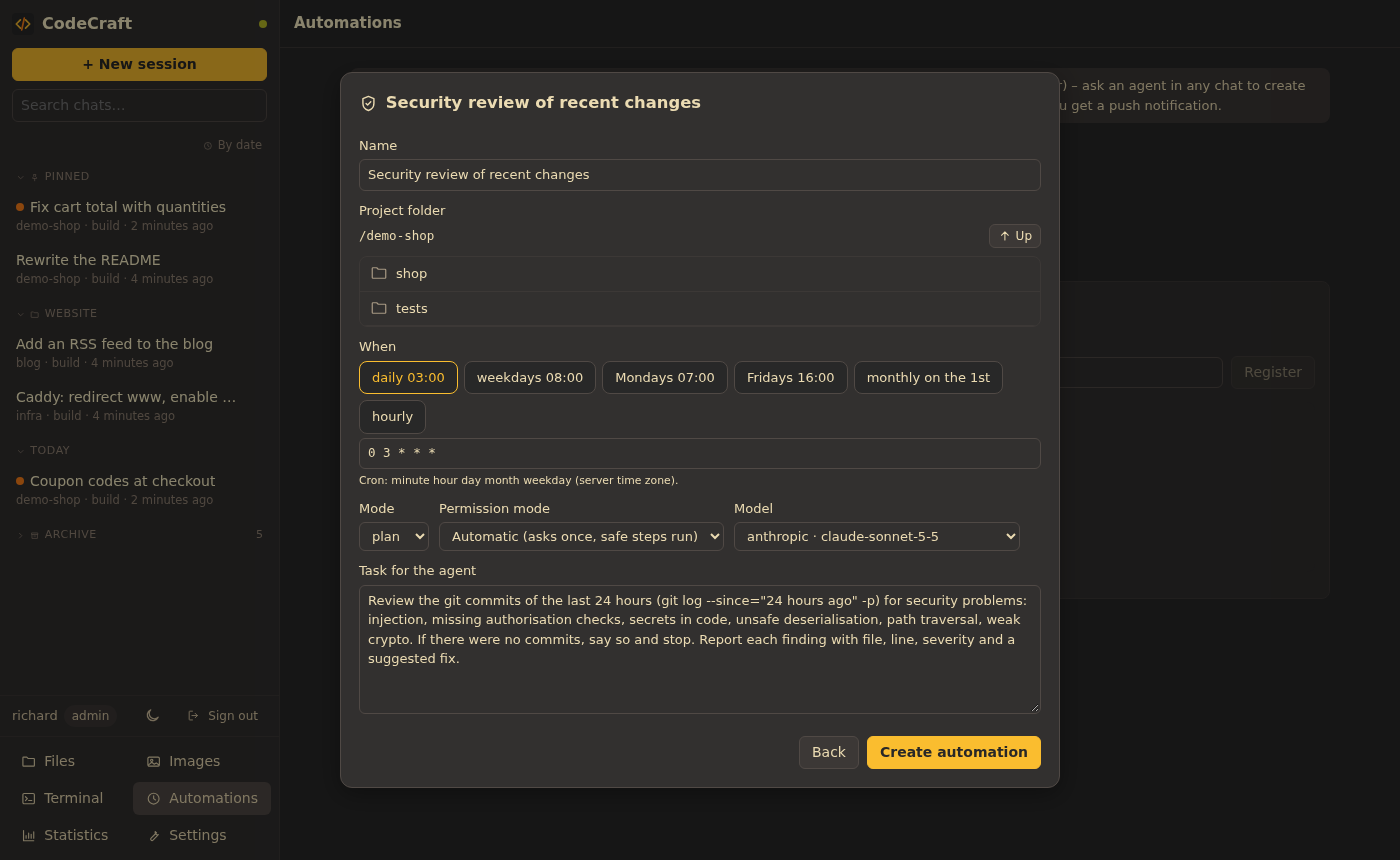
Creating an automation from a template: schedule chips, cron expression, mode, permission mode, model and the task for the agent

An automation is an agent that starts on a schedule. Its instructions are a Markdown file (`.codecraft/jobs/.md`, only the prompt); name, schedule, mode, model and limits are set in the UI, with a graphical schedule editor (every few minutes, hourly, daily, on weekdays, monthly or a cron expression). *New automation* creates the file – blank with an example structure or from a template (dependency check, security review of recent commits, test suite health, daily summary, TODO report, documentation freshness) – and opens an editor with an assistant chat in which a model works out the instructions with you and writes the file. You can also ask an agent in any chat to set one up. Each run is a normal chat session, so you can read and continue it. **Webhooks** start an automation from outside, e.g. on every push: the request is checked with a shared secret or a Gitea/GitHub HMAC signature, and its JSON payload is handed to the agent. ## Code factory The factory turns issues on your Git forge (Gitea, GitHub or GitLab) into reviewed, built, accepted and merged changes – with agents doing the work and you deciding at the points that matter. It is the **Factory** page in the sidebar; all chats it creates live in the sidebar folder *Factory*. ``` issue + label "factory" │ ▼ review ──► question (the agent asks in the issue; you answer, it continues) │ └──► rejected (not buildable as written) ▼ approved ──► building ──► qa (acceptance) ──► done ──► PR merged ──► version + tag ──► closed ▲ │ └── rework ◄──┘ (up to N rounds, then failed) ``` **Phases.** Each phase is a normal CodeCraft chat in the sandbox, so you can open and read it. The agent's answer ends with a JSON result that the factory parses; everything else is done by the server. 1. **Review.** An agent reads the issue and the repository and decides: *approved*, *question* (it comments in the issue and waits for your reply) or *rejected*. It also writes acceptance scenarios. The scenarios are stored in the factory database and are **never shown to the builder**, so the build cannot be tuned to the test. 2. **Build.** The builder works in its own git worktree on the branch `factory/issue-`. The server – not the agent – commits, pushes (never forced) and restores the spec file. 3. **Acceptance.** A different agent checks the pushed branch in a clean checkout against the scenarios, using the repository's `.factory/setup.json` to build and start the app. Each scenario ends as `pass`, `fail`, `unverified` or `out_of_scope`; the verdict comes from these results, not from the model's opinion, and a run without any pass or fail counts as failed. On *pass* the factory opens the pull request (if none is open) and comments a result table in the issue. On *fail* the issue goes back to the build with the findings (*rework*). 4. **Done, merge, version.** You review the pull request in the factory (diff, description) and merge it there. The factory then pulls the merge, gives the issue its version, commits `VERSION`, pushes an annotated tag, comments on the issue and closes it. Issue text is treated as data, never as instructions for the factory itself. **Scope.** An issue body can contain `Spec: ` and `Scope: ` lines. Review, build and acceptance then restrict themselves to that deliverable, so a big specification is built in small steps instead of one huge run. Without a `Scope:` line the review picks the first unbuilt milestone of the spec. `Prerequisite:` lines name what must be merged first. **Planning with a model.** Three chats help you create issues, without the usual review loop: - **Spec chat** (*New project*): works out a specification with you and creates the repository with `docs/specs/.md`, the factory setup and the first issues. - **Plan a feature**: you describe a feature or a bug; the model asks questions and ends with a list of issues (title, description, scope, prerequisites). - **Cut a milestone**: the model splits a milestone of the spec into numbered deliverables (`M2.1 – …`). *Create issues* shows the proposal for editing and files the issues on the forge. They get the `factory` label only if you tick *Start right away*; by default you set the label yourself, one after the other, because later issues build on the merged earlier ones. **Versions and releases.** Every issue that is merged raises the version of the repository (starting from the highest `vX.Y.Z` tag): a deliverable of a milestone raises the **patch** number (0.0.1, 0.0.2, …); the **last** open deliverable of a milestone (`M.`) raises the **minor** number and resets the patch (M1 complete → 0.1.0). Issues without a milestone (bugs, features) raise the patch number. The factory writes the `VERSION` file, pushes the tag `vX.Y.Z` and closes the issue. The **Release** button turns the current version into a release, e.g. 0.x → 1.0.0: it builds what the repository's `.factory/release.json` describes (Docker image for amd64 and arm64 pushed to your registry, a source zip, extra files by glob, shell commands), tags it and creates the release on the forge with notes from the git log and the files attached (Gitea and GitHub). **Settings per repository** (*Factory → Repositories*, *New repository*): forge connection and token, label (default `factory`), parallel runs, allowed issue authors (default: the token's owner), and per phase the model, agent (CodeCraft or Claude Code), permission mode, timeout and tries on technical failures, plus the number of rework rounds (default 2). Failed or rejected issues can be restarted from the board, finished ones are closed with a comment. **Files in the repository** (all optional, kept in `.factory/`): | File | Purpose | |---|---| | `setup.json` | How acceptance installs and starts the app: `install`, `start`, `url` | | `release.json` | Recipe for releases: image, platforms, Dockerfile, build args, commands, files | Repositories are cloned into a separate factory area, not into your workspace, and agents never see the forge API token. ## Integrations - **Telegram:** connect your own bot (*Settings → Account → Telegram*) and use CodeCraft from Telegram – sessions, modes, models, approvals with buttons, photos and files; `/help` in the bot lists the commands. - **API tokens** (*Settings → Account*) with full or read-only scope for scripts and the terminal client. - **Prometheus:** set `server.metrics_token` and scrape `GET /metrics` with `Authorization: Bearer ` – requests, errors, tokens, cost and time per model, provider status, sessions, pending permissions. - **JSON logs:** `CODECRAFT_LOG_FORMAT=json` writes one JSON object per line. - **Backups:** daily at 03:00 into `/data/backups` (the last 30 are kept), optionally copied to any S3-compatible bucket (AWS, MinIO, Garage, Backblaze B2, Hetzner). *Settings → Audit* shows them, creates one on demand, downloads them and restores one – a stored backup or an uploaded zip, e.g. to move to another server. The current state is backed up first, then CodeCraft restarts with the restored database and configuration. - **Health:** `GET /api/health` for monitoring, with version and commit. ## Users and security - Local accounts (Argon2 passwords) and single sign-on via OpenID Connect (Authentik, Authelia, Keycloak, …) with optional admin and access groups. - **Admins** manage providers, MCP, permissions, users and shared folders and see all statistics. **Users** see their own sessions and statistics. - Every user works in `/`; admins can share additional folders. Sessions are private and can be shared read-only. An audit log records sign-ins, permissions and configuration changes. - Shell commands of non-admin users run in a **bubblewrap sandbox**: read-only system, only their folders writable, own home and processes, no server environment. It needs the security options in the compose file; without them non-admins cannot run shell commands. - The browser tool reaches the internet and `localhost`, never addresses in private networks. ## Statistics

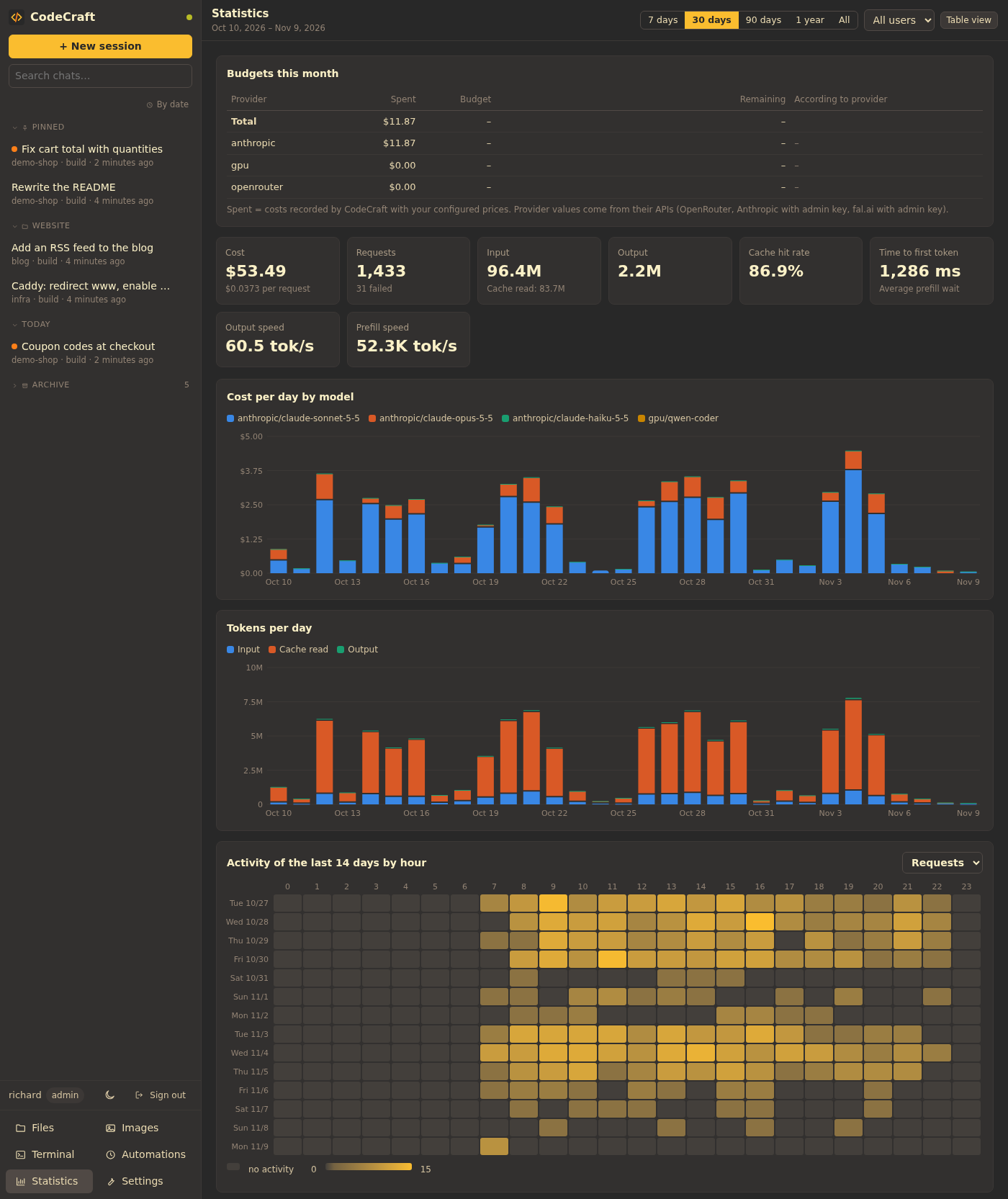
The statistics dashboard: monthly budgets, cost and token tiles, cost per day stacked by model, tokens per day, and an activity heatmap of the last 14 days in the theme accent color

Every model request is stored with input, output and cache tokens, time to first token, prefill and output speed, and its cost at the price configured at that moment. The dashboard shows totals, cost per day by model, tokens per day, an activity heatmap of the last 14 days, and tables per model, provider, mode, user and session – each chart also as a table. Turn on the daily cost summary to get a push notification every evening. ## Configuration One commented TOML file, `/data/config.toml` in the volume, created from [`config.example.toml`](config.example.toml) on first start. The settings pages edit it in place and keep your comments. Secrets belong in the environment and are referenced as `${NAME}`. | Section | Purpose | |---|---| | `[server]` | workspace, default and small model, currency, auto-compaction, subagent limit, `metrics_token` | | `[providers.]` | `kind = "anthropic" \| "openai"`, `base_url`, `api_key`, `max_concurrency`, `models` (with prices and `fallback`) | | `[mcp.]` | `type = "stdio"` (command, args, env) or `"http"` (url, headers) | | `[permissions]` | `allow` / `ask` / `deny` per tool (globs like `mcp__*`); `bash_rules` for commands | | `[agents.]` | modes and subagents: model, tools, `max_parallel`, prompt | | `[auth]`, `[auth.oidc]` | sign-in, public URL, single sign-on | | `[sandbox]` | shell sandbox for non-admins (`auto`, `always`, `off`) | | `[backup]`, `[backup.s3]` | daily backups, retention, S3 target | | `[images]` | fal.ai key, budget, `models` with `stage` (`preview` / `final`), `good_for` and `reference_param` | | `[craft]` | headless browser, screen widths, clean room | Compound shell commands (`&&`, `;`, `|`) are only auto-allowed when every part is allowed. ## Themes Pick a **base theme** in *Settings → General* and switch **light / dark / auto** there or with the theme button in the sidebar (auto follows the system preference). Every base theme has a dark and a light variant. The palettes come from [zink/trilium-themes](https://git.familie-zink.org/zink/trilium-themes) (MIT, see [`web/src/themes/LICENSE-trilium-themes`](web/src/themes/LICENSE-trilium-themes)), which in turn are based on: | Theme | Variants | Palette source | License | |---|---|---|---| | Gruvbox | Dark, Light | [morhetz/gruvbox](https://github.com/morhetz/gruvbox) | MIT | | Ash | Dark, Light | original, Gruvbox-derived ([zink/trilium-themes](https://git.familie-zink.org/zink/trilium-themes)) | MIT | | Harbor | Dark, Light | [HANCORE-linux/omarchy-harbordark-theme](https://github.com/HANCORE-linux/omarchy-harbordark-theme) | MIT | | Coffee | Dark, Latte | [megabyte0x/omarchy-coffee-theme](https://github.com/megabyte0x/omarchy-coffee-theme) | MIT | | Solarized | Dark, Light | [Solarized by Ethan Schoonover](https://ethanschoonover.com/solarized/) | MIT | | Tokyo Night | Night, Day | [folke/tokyonight.nvim](https://github.com/folke/tokyonight.nvim) | Apache-2.0 | | Tintenblau | Dark, Light | original (zink/tintenblau desktop theme) | private | Further standard themes (palettes re-created from the published colour specifications): | Theme | Variants | Palette source | License | |---|---|---|---| | Nord | Dark, Light (Snow Storm background) | [nordtheme/nord](https://github.com/nordtheme/nord) | MIT | | VS Code | Dark Modern, Light Modern | [microsoft/vscode](https://github.com/microsoft/vscode) | MIT | | GitHub | Dark, Light | [primer/github-vscode-theme](https://github.com/primer/github-vscode-theme) | MIT | | Catppuccin | Mocha, Latte | [catppuccin/catppuccin](https://github.com/catppuccin/catppuccin) | MIT | | One | One Dark, One Light | [atom/atom](https://github.com/atom/atom) | MIT | | Dracula | Dracula, Alucard | [dracula/dracula-theme](https://github.com/dracula/dracula-theme) | MIT | | Rosé Pine | Main, Dawn | [rose-pine/rose-pine-theme](https://github.com/rose-pine/rose-pine-theme) | MIT | | Everforest | Dark, Light | [sainnhe/everforest](https://github.com/sainnhe/everforest) | MIT | | Kanagawa | Wave, Lotus | [rebelot/kanagawa.nvim](https://github.com/rebelot/kanagawa.nvim) | MIT | Colours, syntax highlighting and chart palettes come from CSS variables, one file per variant in [`web/src/themes`](web/src/themes). To add a base theme ``: 1. Copy `gruvbox-dark.css` / `gruvbox-light.css` to `-dark.css` / `-light.css` and change the values on `:root[data-theme="-dark"]` / `"-light"`; note source and license in the header. 2. Import both in `themes/index.ts` and add the base theme to `THEMES` in `web/src/theme.ts`. The variables cover surfaces (`--bg0`–`--bg3`), text (`--fg0`–`--fg3`, `--muted`), accents, diffs, syntax (`--syntax-*`) and the browser bar colour (`--theme-color`). The chart palettes (`--series-1`–`8` categorical, `--seq-1`–`6` sequential) live in `themes/base.css` per light/dark mode and are validated for colour-vision deficiencies. ## Development Requirements: Rust (edition 2024) and Node ≥ 20.19. ```sh # backend – writes ./data/config.toml on first start cd server && CODECRAFT_CONFIG=../data/config.toml cargo run # frontend with hot reload, proxies /api to 127.0.0.1:8787 cd web && npm install && npm run dev # terminal client cargo run -p codecraft-cli ``` Tests: `cargo test --workspace` · type check: `cd web && npx tsc --noEmit`. ``` core/ shared crate: types, config, providers, permissions, prompts server/ Rust (axum, tokio) runner.rs agent loop: streaming, tools, permissions, subagents, compaction tools/ built-in tools (files, shell, web, browser, agent, craft) mcp.rs MCP client (stdio, Streamable HTTP, elicitation) jobs.rs automations and webhooks auth.rs users, sessions, API tokens, OpenID Connect cli/ terminal client (ratatui) web/ React + Vite PWA src/components chat, composer, cards, settings, statistics src/themes CSS themes src/i18n English (reference) and German ``` The Docker build cross-compiles the server and the terminal client with [cargo-zigbuild](https://github.com/rust-cross/cargo-zigbuild), so a multi-arch image builds quickly on either architecture: `docker buildx build --platform linux/amd64,linux/arm64 -t /codecraft: --push .` Releases are named `vYYYYMM-NNNNN`: year and month, then a counter that starts at 00001 every month. Collect changes under `## [Unreleased]` in the changelog (and under `unreleased` in `web/src/whatsnew.ts`), then `scripts/release.sh` picks the next number, renames both, commits, tags, builds and pushes the image (`:vYYYYMM-NNNNN` and `:latest`) and publishes the Gitea release (`--dry-run` shows the steps). The `Cargo.toml` versions are not used for releases. Translations: copy `web/src/i18n/en.ts`, translate the values and register the language in `web/src/i18n/index.ts` – the type checker reports missing keys. ## Status Early, but in daily use. See the [changelog](CHANGELOG.md). Planned next: - Terminal client builds for macOS and Windows - MCP OAuth, resources and prompts - The OpenAI Responses API ## License [MIT](LICENSE) © Richard Zink. The theme palettes keep the licenses listed under [Themes](#themes).